ImajSite System Builder
maketree.bat
The ImajSite System Builder is a powerful command line application that
rapidly rebuilds an entire directory tree, including all subdirectories and the
index database.
All subdirectories that contain build scripts are rebuilt
by executing the build scripts.
System Builder has the ability to very quickly search for only those directories
that have changed since the last build, and rebuild only the changed directories.
This greatly speeds up modifications to the system.
You should run System Builder each time you add, delete, or move files in a
subdirectory. This ensures that all index links are
correct, and that the index database remains up-to-date.
Since System Builder only updates directories that changed, this step is very quick.
The easiest way to run the System Builder from Windows is to create a file named
"makeall.bat" in the starting directory.
This file should contain a single line to invoke "maketree" as follows:
maketree 1
Once this file is created, you can run the System Builder by simply double-clicking
on the "makeall.bat" file from within an Explorer window.
You can also place "makeall.bat" files in subdirectories if you wish to
update individual subdirectory trees without updating the entire hierarchy from
the starting directory. This can speed up updates for very large trees.
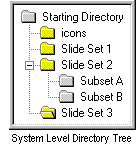
For example, you could place a "makeall.bat" file in the "Slide Set 2" directory
shown in the diagram at the right if you only update the "Slide Set 2" directory
and/or its subdirectories.
You can also run System Builder directly from the command-line.
Simply open an MS-DOS Prompt window and change to the
starting directory.
Then type "maketree" with the appropriate command line arguments.
For a complete list of command line options, type "maketree /?" at the
command prompt.
How It Works
The ImajSite System Builder performs the following steps:
Step 1: Builds Indexes and Slides (pass 1)
Runs the makeindx.bat build script in all directories
that need to be built or rebuilt.
This step is performed very quickly by the Directory Tree Builder utility "mkhtmidx".
Only directories that are new or have changed since the last build will be rebuilt.
Updates the index database by scanning the directory
structure and adding or replacing any existing entries in the database with the
current ones.
This step is performed by the Index Database Creator utility "mkhtmidb".
Runs the makelink.bat build script in all directories
that contain a symlinks.txt or makelink.bat file.
If the directory contains a symlinks.txt file but not a makelink.bat file, the
default makelink.bat file is run.
The default makelink.bat file checks the symlinks.txt file for valid links.
Step 4: Builds Indexes and Slides (pass 2)
Runs the makeindx.bat build script in all directories
that need to be rebuilt.
This is identical to step 1 except that only directories that changed in step 3
are rebuilt.
Step 5: Displays the Error Log
If any errors or warnings occurred during the build, the error log is displayed
to the user.
The ImajSite System Builder also has a mode (maketree 0) to perform
only steps 1 and 5 if the user does not need the index database
to be updated. This mode is the fastest way to run the System Builder.
Table of Contents
Copyright © 1996-2003 Christopher P. LaRosa. All Rights Reserved.