
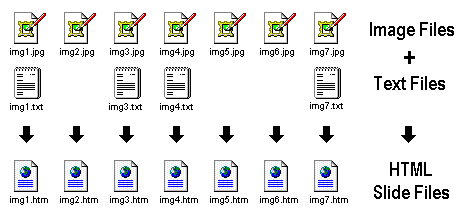
Figure 1
Here are some things you can do with ImajSite:
Figure 1 below shows the input files and the resulting output files. You can click on an output file in the diagram to display information about that file.
ImajSite automatically creates an index file for the directory, named "index.htm", which lists all of the HTML files in the directory. The layout of the index file is very flexible. It can be as simple as a list of text links, or as complex as a contact sheet of thumbnails. It can display descriptive icons next to each entry which are automatically selected based on keywords in the HTML file. The color and layout can be customized by using configuration files and index template files.
To view the contents of the directory and the images contained in it, simply open the "index.htm" file with any web browser. You can view the image files randomly or sequentially and scale the images so that they fit within the browser window, regardless of the actual image size. ImajSite has the ability to specify the order in which images appear in the index, and the sequential order in which they are viewed (alphabetically, by default).
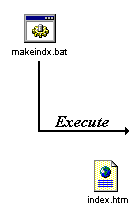
Before executing the build script for the first time, you must create an icons directory in either the current directory or in one of its parent directories. The icons directory contains shared files that are used by the index and slide files. The icons directory must contain the files supplied in the ImajSite distribution package. You can simply copy the entire "icons" directory from the ImajSite installation directory to your current directory or one of its parents.
You can add or remove image files or subdirectories at any time, and then simply re-execute the build script to update the index. New slide files will be built for any new images that are added, and existing slide files will be updated only if necessary. The text content of a slide file (from the original .txt file) is always preserved when the slide file is updated. In addition, any file information in existing index or slide files is also preserved.
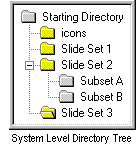 If you have a large number of files, you may arrange the files into subdirectories,
beginning with a starting directory (which is where you will start
your browser), and any number of subdirectories off the starting directory.
The index for each directory will automatically contain links to the indexes of any
subdirectories contained in that directory.
The diagram at the right shows an example of a system level directory tree:
If you have a large number of files, you may arrange the files into subdirectories,
beginning with a starting directory (which is where you will start
your browser), and any number of subdirectories off the starting directory.
The index for each directory will automatically contain links to the indexes of any
subdirectories contained in that directory.
The diagram at the right shows an example of a system level directory tree:
You can also assign keywords to HTML files (index files, slide files, or other HTML files) and then search for files using keyword search expressions or query search expressions.
In order to perform searches across multiple directories, you must first create an index database. The index database is then incrementally updated by using the maketree command. Once the index database is created, it can be used to create static directories which contain links to items with a specific search criteria. It can also be used in CGI mode to dynamically generate an index based on user-specified search criteria.